Teams | Collaboration | Customer Service | Project Management

Enabling the Remote Workplace with M-Files: Valeo Financial Advisors

The world changed in 2020. Companies face a new reality where work is done from kitchen tables, spare bedrooms and home offices. Remote work went from a nice perk to a mandatory directive. Future-proof your business by enabling secure access to documents and information while minimizing risk with M-Files. M-Files ensures the efficiency and productivity of your team, no matter where they are - their home, the hotel, the office, the airport, a coffee shop... anywhere.

The keys to excellent internal help desk management

Businesses are laser-focused on customer experience and customer service today. And as work transitions from in-person to remote, customers are heavily relying on digital channels for help. This is no different for your employees — they need digital internal help desk solutions now more than ever. Companies are leaning even more heavily on technology to keep their customers and employees connected while the world is in survival mode.

May 2020 Version Update: Introducing Expenses And More

Now that we know a number of meetings could have just as easily been emails, a vast majority of emails could be skipped altogether by managing your business with the help of Scoro. With this update, we’re adding a brand new tool to Scoro for handling various business expenses. In addition, we’re upgrading the Planner for even more convenient work planning, and making additions to Zapier for creating custom workflows to further increase work efficiency.

5 ways to build trust for your online shop

A guest post from Alon Eisenberg at Trusted Shops. Building trust for your website is essential to building a loyal customer base. Why? Simply put, trust is the inspiration people need to enter their credit card information on your website. Unless you’re Amazon or another really famous brand, there will be some level of hesitation from shoppers when they visit your shop for the first time.

Visualize your progress with Board View in Teamwork

Visualize your progress with Board View in Teamwork to see the flow of tasks and activities -- so that anyone can see how a project is progressing at a glance With lots of tasks and activities, it can be difficult to see project progress. Visualize it, with Board view in Teamwork and at a glance, see how your project is progressing. See who’s working on what, how each task is progressing,and with customizable tags it’s easy to see how each task fits into the project’s ecosystem — and how they contribute to the big picture.

Introducing Status for remote work

When you’re working remotely, keeping your stakeholders informed on the progress of your work becomes even more important to keep teams in sync and projects moving forward. Workers use an average of 10 different tools throughout the day, and any one of them might contain the information you need for your weekly status update. That’s why we’re excited to announce our new Status feature.

How to navigate the lasting impacts of COVID-19 on customer support

Forget what you think you know about customer support, for now. In just a few short months, COVID-19 has transformed the way businesses and customers interact. As customers, we’ve heard from just about every company we’ve ever done business with. Remember that hair salon you went to in college? How about that time you bought dad new grill equipment from an online supplier? One after another, subject lines read like concerned emails from friends.

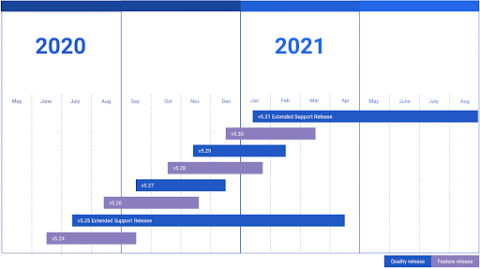
Support for ESR 5.9 has ended: Upgrade to ESR 5.19 for improved security, performance, mobile app compatibility, and user experience

As of April 15, 2020, Mattermost Extended Support Release (ESR) version 5.9 is no longer supported. If any of your servers are not on ESR 5.19 or later, we highly recommend that you upgrade immediately. With our simple upgrade steps, it takes only a few minutes. Mattermost adopts a monthly tick-tock release cycle, with a new version shipping on the 16th of each month.