Teams | Collaboration | Customer Service | Project Management

Telegram vs Signal - A Complete Honest Comparison for 2026

Most people assume Telegram and Signal are basically the same — secure messaging apps that protect conversations and offer better privacy than traditional chat platforms. But the reality is more complicated. Telegram and Signal take very different approaches to privacy, encryption, and how user data is handled. One prioritizes private communication by default, while the other focuses on flexibility and broader messaging features.

Best Collaboration Platforms for Modern Businesses in 2026

Modern workplaces are no longer powered by emails alone. Teams today operate across multiple locations, remote environments, hybrid setups, and fast-moving digital workflows. As businesses scale, communication becomes harder to manage especially when employees switch between multiple apps just to complete daily tasks.This is exactly why collaboration platforms have become a critical part of modern business operations.

Top Communication Models in Business and Media

A delayed response, unclear instruction, or misunderstood message can easily disrupt workplace productivity. In today’s fast-moving business environment, communication is no longer limited to emails and meetings. Organizations now depend on real-time collaboration, instant information sharing, and seamless communication to keep teams connected and productive. This is where communication models become important.

Sweden goes live with Matrix-based federation!

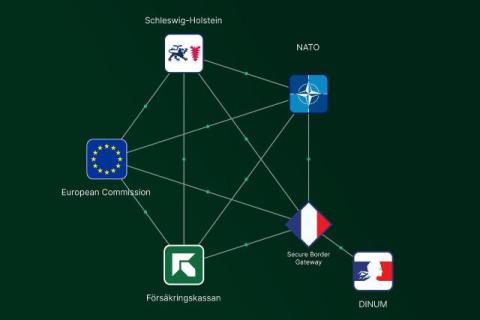
In a landmark demonstration of the power of the Matrix open standard, two of Sweden's major public sector agencies, Försäkringskassan (the Swedish Social Insurance Agency) and Trafikverket (the Swedish Transport Administration), have successfully federated their entirely separate real time communications systems.

Communication Model: Types, Elements & Examples

Communication is a part of everything we do — from workplace discussions and marketing campaigns to social media and team collaboration. However, communication is not always successful. Misunderstood messages, delayed responses, and communication gaps can easily affect productivity and decision-making. This is where communication models become important. Communication models explain how information is shared between a sender and a receiver.

The 10 Best Team Collaboration Tools in 2026 - Free, Enterprise & Secure Picks

Picking a team collaboration tool in 2026 shouldn't take three weeks of demos and a spreadsheet with 47 columns. But with hundreds of options on the market each claiming to be the "all-in-one solution" it genuinely does take that long unless someone has already done the work for you. We did it. This list covers the 10 best team collaboration tools in 2026, ranked by actual usefulness across four things that matter: communication quality, project visibility, security, and value for money.

Google Workspace Essentials Starter: What You Get, What You Don't, and What to Consider Instead

Google Workspace Essentials Starter is free, and it carries the Google brand so it's understandably the first thing many teams consider when setting up collaboration tools. Before you roll it out, though, it's worth knowing exactly what you're getting, where it hits a wall, and when it makes sense to look at something else. This article covers what's included, what's missing, and who this plan actually works for.

Best Productivity Tools: Categories, Features & Top Apps for Teams

Modern businesses don’t struggle because employees lack talent or motivation. Most productivity problems happen because teams lose time switching between apps, searching for files, following up on tasks, or managing unclear communication. As companies grow, these small inefficiencies slowly reduce team performance and delay decision-making. That’s why productivity tools have become essential for businesses in 2026.

Slack School | Connect with External Partners

Collaborating with external partners over email? Slow. Doing it in Slack? Fast. Like, really fast. Slack Connect brings your clients and vendors straight into your workspace so you can work together in real-time. In this episode, we’ll show you how to send external channel invitations, manage member permissions, and navigate your centralized external connection settings right from Slack. Class dismissed!

Smarter Workflows, No Code Required: Introducing New AI Steps in Workflow Builder

We’ve all been there. You’re in the middle of your most important work when a notification pulls you out of your flow. A project lead needs a status update. A client is asking about a ticket. Finding the information in Slack is easy – but pulling it together and drafting a clear response takes time you don’t have. At Slack, we believe that making automation workflows accessible to everyone is the key to unlocking true organisational productivity.