

Teams | Collaboration | Customer Service | Project Management

From helplessness to sovereignty: what eight years of research says about trust in tech

When people say they care about privacy but hand over their data anyway, the usual explanation is that they're trading it for convenience. Dr Denise Almeida, Head of Policy and Compliance at Element, has spent eight years researching how tech workers think about privacy, and she reckons that explanation gets it backwards. What her participants described wasn't a trade. It was the absence of a choice.


Beyond Group Texts: How Team Collaboration Platforms Help Field Teams Coordinate Multi-Visit Jobs

A one-visit service call is usually easy to track. The technician arrives, fixes the problem, collects a signature and drives off. Jobs that stretch across three or four appointments are harder, because each visit can depend on what the last person saw, promised or left unfinished. Many field businesses still carry that context in group texts, phone calls and memory. Texts and calls are fast. They rarely leave a shared record the next technician can search on a doorstep at 8 a.m.

ServiceNow Chatbot: How to Build One for IT & HR Support 2027

Using ServiceNow for IT Service Management (ITSM) is great and all, sure employee satisfaction grows from 1.5/5 to 3.5/5 or companies using ServiceNow but did you know you can make internal IT support experience even more engaging for your employees using Conversational AI? Hearing about this now only? Don’t worry, we got you covered. By automating ServiceNow tasks with a Conversational AI/Chatbot, you are bound to provide self-service that employees love.

Staff messaging for Canadian clinics: A practical guide to PIPEDA and PHIPA

At 7:45 a.m., a clinic manager has three messages to deal with. Someone needs to cover the front desk. The check-in tablet at another location has stopped working. A clinician has a patient update for the incoming care team. All three could land in the same group chat. But they don’t necessarily belong there. Each message involves a different decision about who should see it, where it should be handled, and what needs to happen next.

What is computer monitoring? How it works, laws, and tools to use

What is computer monitoring? It’s the use of software to record how work computers are used, such as apps, websites, active and idle time, and file activity. Employers use it to see what distributed teams are working on, keep payroll and billing records accurate, and protect company data. In a 2023 American Psychological Association survey, 51% of US workers said their employer uses technology to monitor them at work.

From Team Conversations to Project Commitments: Managing Handoffs and Dependencies

On Monday morning, a sales manager tells the implementation team that a customer expects to go live in three weeks. Someone replies that the timeline looks reasonable. A colleague from finance asks for more information about an additional cost, and the customer success team shares a document with the latest requirements. By the end of the day, everyone appears to be on the same page. A week later, implementation has barely started.

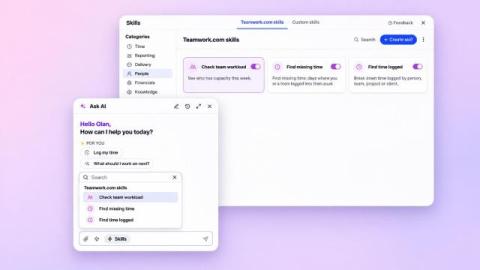
Check who has room for the new project with AI skills and your team's logged hours

The client signed on Friday. Kickoff is Wednesday. It’s Monday morning, and a project manager is already asking, “Who can I put on it?” One designer looks free on paper, but they spent most of Thursday and Friday on a round of revisions. A developer looks fully booked, but you know one of their deadlines has slipped. And three people still haven’t finished their timesheets.

Encrypted isn't Approved: Why Signal is not Secure Enough for Defense Work

In the defense sector, a messenger is only considered safe if it is approved. Encryption alone is not enough. While Signal's encryption is strong, it’s still a consumer app. It hasn’t been approved for nonpublic or classified defense information in Germany, the US, or France, and it doesn’t give organizations administrative control over accounts or messages.

4 ways to simplify your Zendesk reporting

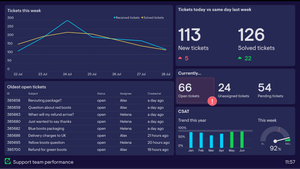
You shouldn’t have to become a reporting specialist to find out why your ticket queue is growing or whether response times are slipping. And once you’ve found the answer, getting it in front of the team shouldn’t become another job. The quickest route depends on what you need: a report for your weekly review, an answer to a specific question, or a dashboard the team can follow throughout the shift. Here are four ways to get the numbers you need without building everything from scratch.