Teams | Collaboration | Customer Service | Project Management

Outgrown Trello? 8 alternatives that retire the spreadsheet beside your board

For most of my nine years in agencies, moving tasks along was the easy part. The hard part lived in spreadsheets: who was free next week, which hours never got logged, and whether a retainer still paid its way. I had a basic timer and a lot of tabs, and the tabs were always a few days behind. I work at Teamwork.com now, and I see the same thing in teams shopping for Trello alternatives. Trello is still a strong board, and Premium adds Timeline, Table, Calendar, Dashboard, and Map views.


11 ClickUp alternatives, sorted by what you'd still have to build

ClickUp can be configured to do almost anything, and for a services team that's the catch. It tracks tasks, not money, so rate fields, budget formulas and utilization views all have to be built and maintained by someone on your team. If you're comparing ClickUp alternatives, that build cost is the number to measure first. I work at Teamwork.com. Before that, I spent nine years in agencies, where the numbers I trusted least were always the ones that depended on someone remembering to fill in a field.

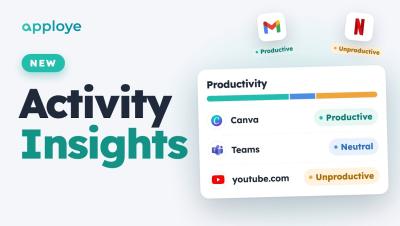
Apploye Activity Insights: Productive vs Unproductive Time + Fake Activity Detection

Apploye Activity Insights is here: see what your team's time actually went on. Every app and website is labelled productive, unproductive or neutral, and Unusual Activity catches mouse jigglers, auto clickers and fake input — even when it's mixed in with real work. This video walks through the whole Activity Insights add-on: where to find it, how the Productivity report works, how to set your own rules, what Unusual Activity flags, what's coming next, and the launch pricing.

DPDP Act Compliance Checklist Every CIO And CISO Must Complete Before An Audit

Most Indian enterprises have read the DPDP Act by now. Far fewer have tested whether their security stack can prove what it asks for. That gap matters more than awareness. When the Data Protection Board, a customer’s due diligence team or an internal auditor asks how personal data on employee endpoints is protected, a policy document will not settle the question. Controls, logs and evidence will.

Every shift, every site, every team: Introducing Slack Frontline

To your customers, your frontline workers are your brand: the shop assistant who finds the right size, the warehouse lead who ships the order, the home nurse who checks in. They make up about 80% of the global workforce, yet they’ve been left out of the last decade of workplace transformation. While corporate teams have agents, instant customer data and connected systems, the frontline often runs on paper checklists and group texts, without even a corporate email address.

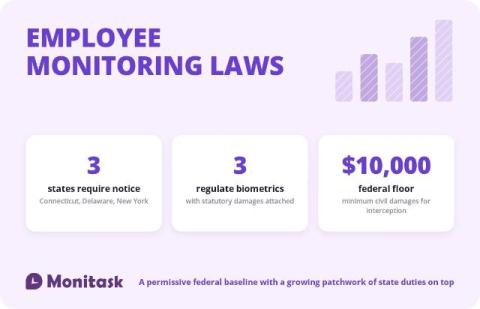
Employee Monitoring Laws

Employee monitoring is lawful across the United States. That is the correct starting point and it is where most guides stop, which is why employers get caught out by the second half. Federal law permits an employer to monitor its own systems for a legitimate business reason. Four states add a duty to give prior written notice, three regulate biometric identifiers, and a separate set of rules governs audio recording, video, GPS and how monitoring data is later used.

Context engineering: managing context quality for more efficient, effective AI

In 2025, companies spent a collective $581 billion on AI. The results were underwhelming: according to a study by MIT, 95% of Enterprise AI pilots showed zero impact on organization’s bottom lines. In short, the vast majority of AI pilots are unsuccessful. The reflex is to blame the models. The evidence points somewhere easier to control: context. Every answer AI produces is assembled from a context packet—the material used to respond to the presented prompt.