

|
By Augusto Diaz
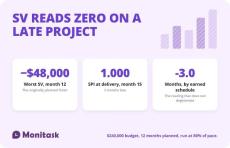
Schedule variance is SV = EV − PV: earned value minus planned value at a point in time. Negative means behind plan. The result is in currency, not days, and it has a property most explanations omit — as a project finishes, earned value converges on planned value, so SV approaches zero and the schedule performance index approaches 1.0 even when the project is late.
|
By Augusto Diaz
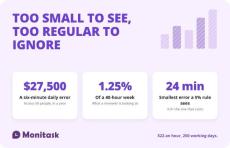
A timesheet error is a difference between hours worked and hours recorded. The expensive ones are small and regular rather than large and rare: 6 minutes a day costs $27,500.00 a year across 50 people at $22.00 an hour, and amounts to 1.25% of a 40-hour week — below the threshold any practical review would flag. Under 29 CFR § 785.11, hours the employer knows or has reason to believe were worked count as hours worked whether or not they were recorded. > This is not legal advice.
|
By Augusto Diaz
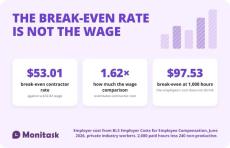
Contractor time tracking records hours against work rather than against a schedule. The distinction matters beyond bookkeeping: the IRS asks whether a business controls “or has the right to control what the worker does and how the worker does his or her job,” so a system that sets a contractor’s hours is itself a factor. And the rate at which a contractor stops being cheaper than an employee is $53.01, not the $32.82 an employee earns. > This is not legal or tax advice.
|
By Augusto Diaz
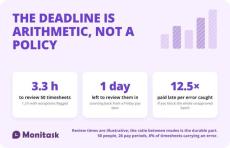
The timesheet approval process is the set of steps between an employee recording hours and those hours reaching payroll: submission, review, correction, approval and period close. The deadline is not chosen, it is counted backwards from pay date. The review is not a matter of diligence, it is a matter of how many hours the approver has.
|
By Augusto Diaz
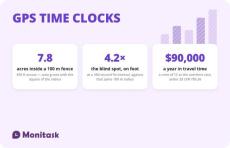
A GPS time clock records a location alongside each clock-in and clock-out, so a timesheet carries where the work started as well as when. It answers the attendance question for field crews that a desk time clock cannot. It does not provide continuous proof of presence: the accuracy figures in circulation measure the satellite signal rather than a phone, and a geofence confirms position at the moment of a fix rather than detecting the moment someone leaves. > This is not legal advice.
|
By Augusto Diaz
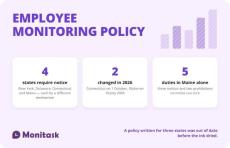
An employee monitoring policy is a written document that tells employees what the employer monitors, why, where, how long the data is kept and who can see it. Four states — New York, Delaware, Connecticut and Maine — require notice before monitoring begins, each by a different mechanism, and two of those four laws changed during 2026. The template below is free to copy in three formats, and the sections marked with brackets are the ones you replace.
|
By Augusto Diaz
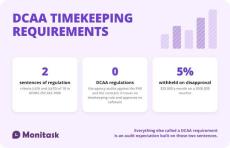
The Defense Contract Audit Agency issues no timekeeping regulation. The requirements come from the contract: DFARS 252.242-7006(c)(9) and (c)(10) require a timekeeping system that identifies labor by cost objective and a labor distribution system that charges direct and indirect labor correctly. Everything else called a “DCAA requirement” is audit practice derived from those two criteria and from the FAR cost principles.
|
By Augusto Diaz
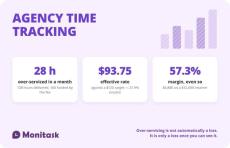
Agency time tracking exists to answer one question: did the fee cover the work. A $12,000 monthly retainer at a $120 target rate funds 100 hours. Deliver 128 and the effective rate drops to $93.75, with 28 hours of over-servicing worth $3,360. Hours by client, by role and by activity are what turn a retainer into a margin number.
|
By Augusto Diaz
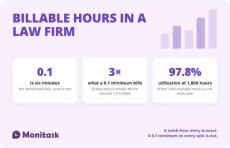
Law firms bill time in tenths of an hour: six minutes is 0.1. Each entry carries a matter number, a timekeeper, the time, and a description of the work. Firms acting for corporate clients and insurers add UTBMS task codes and submit invoices in the LEDES format. The ABA Model Rules require the fee to be reasonable and the basis for it to be communicated to the client — and say nothing at all about rounding, which is where most of the trouble starts.
|
By Augusto Diaz
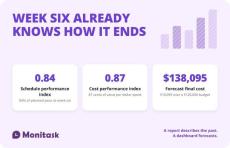
A project management dashboard shows the few numbers that tell you whether a project will finish on time and on budget. The core set is schedule variance, cost variance, the schedule and cost performance indexes, and a forecast of final cost. All four come from three inputs: the budget, the percentage of work actually complete, and the cost incurred to date.



|
By Monitask
Screenshot monitoring is completely transparent to the employees and they control when the monitoring starts and when it stops.
- November 2026 (4)
- October 2026 (35)
- September 2026 (7)
- July 2026 (1)
- May 2026 (1)
- March 2026 (2)
- February 2026 (5)
- January 2026 (3)
- December 2025 (3)
- November 2025 (2)
- October 2025 (4)
- September 2025 (4)
- August 2025 (4)
- July 2025 (3)
- June 2025 (3)
- May 2025 (2)
- April 2025 (5)
- March 2025 (4)
- February 2025 (5)
- January 2025 (4)
- December 2024 (7)
- November 2024 (11)
- October 2024 (2)
- September 2024 (4)
- August 2024 (7)
- July 2024 (8)
- June 2024 (9)
- May 2024 (14)
- April 2024 (12)
- March 2024 (13)
- February 2024 (6)
- January 2024 (8)
- December 2023 (12)
- November 2023 (21)
- October 2023 (1)
- September 2023 (20)
- August 2023 (22)
- July 2023 (13)
- June 2023 (10)
- May 2023 (14)
- April 2023 (12)
- March 2023 (13)
- February 2023 (9)
- January 2023 (11)
- December 2022 (11)
- November 2022 (13)
- October 2022 (12)
- September 2022 (7)
- August 2022 (8)
- July 2022 (12)
- June 2022 (13)
- May 2022 (13)
- April 2022 (9)
- March 2022 (8)
- February 2022 (3)
- October 2021 (1)
- August 2021 (5)
- July 2021 (8)
- June 2021 (8)
- May 2021 (3)
- April 2021 (5)
- March 2021 (4)
- February 2021 (6)
- January 2021 (3)
- December 2020 (4)
- November 2020 (7)
- October 2020 (6)
- May 2020 (2)
- April 2020 (1)
- March 2020 (1)
- February 2020 (1)
- January 2020 (1)
- November 2019 (2)
- May 2017 (1)
Monitask is an easy-to-use time-tracking software designed for remote teams of employees that includes automatic timesheets and screenshots of employees’ workstations as proof of work done. Screenshot monitoring is completely transparent to the employees and they control when the monitoring starts and when it stops.
Employee Monitoring Software with Screenshots:
- View Employee Computer Screenshots and Records: Our application allows employees and freelancers to manually start a clock when they begin working on an assignment for employers. The application will take computer screenshots randomly or at intervals assigned by the employer, which can be reviewed online, as evidence that work is being performed. No spying, only transparency.
- View Apps Used By Your Team: Monitask monitoring allows you to check the programs your employee or freelancer uses when they track time. You can view a report to let you know each time a program is used and for how long. Analyze the best programs for your workplace to ensure you’re paying for the programs you actually need.
- Create Projects For Your Team: Monitask helps you to manage your team members’ projects. Simply create a project, assign relevant employees, and use the time tracking functionality to gather all the information you need on the project’s progress.
Monitask helps you to stay in touch with your remote team.