


|
By Apploye
Salary determines how an employee is paid, but doesn't show where their working time goes. For teams handling multiple projects or clients, time tracking reveals how employees spend that time, helping businesses measure project costs, plan resources, set realistic deadlines, and identify excessive workloads.

|
By Apploye
We all get excited by the output our team or we bring to the table. But often we forget that these projects may keep going over budget, some employees may be working late, or a task that should take a few hours may take an entire day! These problems are often difficult to spot without proper time data. The best time tracking tools give you a clearer picture of where your team's hours are going. Let’s learn more about the major business problems that time tracking solves.

|
By Apploye
Time tracking has always been a part of better time management. It helps one to better manage their day, understand activity patterns, and complete their daily goals right on time. Well, if time tracking is an integral part of personal time management, why should we overlook this thing when we are running an organization?
|
By Apploye
Employees accept monitoring when it's disclosed upfront, aimed at a stated purpose, and limited to work activity. They reject it when it's hidden, vague, or used to punish small mistakes. The rest of this guide breaks that answer down with the data, the law, and the exact line between the two.

|
By Apploye
Time-tracking tools and system-access controls can support these rules. But these tools should stop the work itself. They should not just stop it from showing up on a timesheet.
|
By Apploye
People call it bossware when the monitoring goes too far. For example, when it is hidden, excessive, unrelated to business needs, or used to punish workers. Here is a simple example. A visible timer that records billable hours is ordinary time tracking. And secretly recording an employee's screen after hours is bossware. Not every kind of monitoring is bossware. The line depends on four things.

|
By Apploye
You've tried logging hours at the end of the day. By then, two meetings, a client request, and a handful of small tasks have blurred together. You enter something reasonable and move on. But reasonable isn't billable, and it isn't defensible. With that being said, I’m here today to fix that. I'll share with you which time tracking method is right for you. By the end, you'll know which method fits your workflow and what each one can actually prove.
|
By Apploye
Most employees have no idea what their time tracking app records. They clock in, the timer runs, and somewhere on a server, data builds up. Depending on the tool, that data goes well beyond working hours. Some apps log URLs visited. Others capture screenshots every few minutes. In fact, a few tracks of the GPS location. To clear things up, let’s understand what data is collected in time tracking apps, what employers do with it, and what you have the right to know.
|
By Apploye
Your team is working hard. But you don't actually know how hard until the hours are logged. I've seen this pattern repeat throughout remote and hybrid teams. The schedule looks reasonable on paper. But the real hours tell a different story. Someone is absorbing more than their share, and nobody flags it until their mental health is already exhausted. That’s why I'll share with you the ways time tracking and work-life balance connect.
|
By Apploye
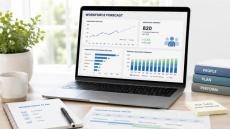
Most problems with staffing don’t just happen overnight. For example, talent shortages quietly build until a project stops. Again, a team keeps working overtime week after week. Meanwhile, you see a hiring request shows up three months too late. These signs pile up slowly until you fall behind. With workforce forecasting, you can catch those problems sooner. You can check what’s coming, notice the weak points, and prepare ahead of time.
|
By Apploye Inc.
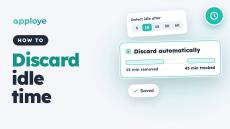
Learn how to discard idle time automatically in Apploye, so idle minutes come off tracked time without anyone having to review them. Go to Settings → Activity → Idle time, choose when time counts as idle, and pick Discard automatically. You can also give individual members their own idle settings.
|
By Apploye Inc.
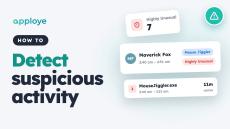
Learn how to detect unusual activity in Apploye: find mouse jigglers, auto clickers, keep-awake apps and macros in the Unusual Activity report, see who used them and for how long, and check the screenshots before you act.
|
By Apploye Inc.
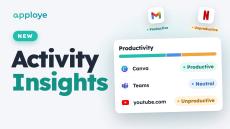
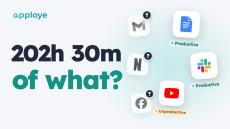
Apploye Activity Insights is here: see what your team's time actually went on. Every app and website is labelled productive, unproductive or neutral, and Unusual Activity catches mouse jigglers, auto clickers and fake input — even when it's mixed in with real work. This video walks through the whole Activity Insights add-on: where to find it, how the Productivity report works, how to set your own rules, what Unusual Activity flags, what's coming next, and the launch pricing.
|
By Apploye Inc.
Your team tracked 202 hours this week. But 202 hours of what? Apploye Activity Insights shows you — every app and website labelled productive, unproductive or neutral, in one report. In 45 seconds: Productive vs unproductive time for your whole team, and for each person Your rules: a level for the whole team, or an exception for one person Unusual Activity: catches mouse jigglers, auto clickers and input that wasn't real Coming soon: Advanced Notifications, the moment someone's late.
|
By Apploye Inc.
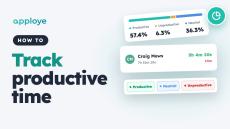
Learn how to track productive and unproductive time in Apploye: open the Productivity report, see how each member's time splits into productive, unproductive and neutral, check every app and website they used, and set the rules — default levels, exceptions for one person, and your own apps.
|
By Apploye Inc.
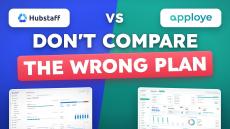
For a 10-person team, Apploye costs $540 a year and Hubstaff Team costs $1,200. Count Apploye's free owner seat and Hubstaff's Insights add-on after its 90-day trial, and the gap is $1,014 a year. Here is Hubstaff vs Apploye side by side: pricing, the plan most people compare by mistake, daily use, and where Hubstaff is the better buy. Made by the Apploye team. We have tried to keep it fair: every Hubstaff price is from Hubstaff's own pricing page and support docs (linked below), and if you manage field teams that need GPS or geofencing, we tell you to buy Hubstaff.
|
By Apploye Inc.
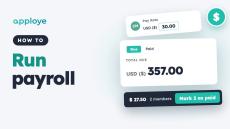
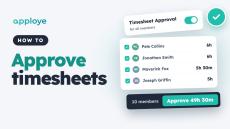
Learn how to run payroll in Apploye: set each member's pay rate, see what you owe, mark payments as paid, record one-time payments, and export a payroll report. Apploye doesn't send money itself — Payroll is your record of what's owed and what's paid.
|
By Apploye Inc.
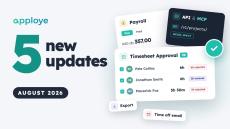
Learn how to approve timesheets in Apploye: turn on timesheet approval, review each member's tracked time, and approve it — one day at a time or your whole team at once. Approved time goes straight to Payroll.
|
By Apploye Inc.
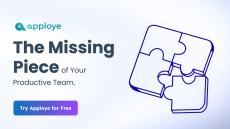
Here are the key features we shipped in August for Apploye! In this update, we’re introducing a completely rebuilt Timesheet Approval workflow with smart signals, a streamlined Payroll redesign, our new Public API & MCP Server for AI workflows, expanded report export customization, and email notifications for time off. Timestamps: Introduction Timesheet Approval Redesign & Smart Signals Redesigned Payroll Ledger & Summary Public API & MCP Server Integration Customized Report Export Options Time Off Email Notifications.
|
By Apploye Inc.
Team meetings, Slack threads, and task lists show that work is happening, but they don't show you how it gets done. Meet Apploye: the all-in-one employee productivity platform that turns tracked time into clear, complete visibility across your remote, hybrid, or in-house teams. Discover how Apploye helps you: Track worked hours with precision. See app/URL usage and catch workflow bottlenecks early. Maintain workplace trust with transparent monitoring notifications.
- October 2026 (6)
- September 2026 (4)
- August 2026 (7)
- July 2026 (6)
- June 2026 (3)
- May 2026 (18)
- April 2026 (14)
- February 2026 (15)
- January 2026 (1)
- December 2025 (14)
- November 2025 (10)
- October 2025 (18)
- September 2025 (5)
- July 2025 (5)
- May 2025 (4)
- April 2025 (8)
- March 2025 (5)
- February 2025 (5)
- January 2025 (7)
- November 2024 (8)
- October 2024 (5)
- September 2024 (3)
- August 2024 (4)
- July 2024 (2)
- June 2024 (2)
- May 2024 (1)
- March 2024 (2)
- January 2024 (1)
- December 2023 (5)
- November 2023 (1)
- October 2023 (4)
- September 2023 (3)
- August 2023 (5)
- July 2023 (5)
- June 2023 (5)
- May 2023 (7)
- April 2023 (6)
- March 2023 (2)
- February 2023 (3)
- January 2023 (7)
- December 2022 (5)
- November 2022 (4)
- October 2022 (6)
- September 2022 (5)
- August 2022 (2)
- July 2022 (3)
- June 2022 (2)
- May 2022 (7)
- April 2022 (9)
- March 2022 (6)
- February 2022 (5)
- January 2022 (8)
- December 2021 (7)
- November 2021 (6)
- October 2021 (1)
- September 2021 (1)
- May 2021 (1)
- April 2021 (4)
- March 2021 (5)
- February 2021 (4)
- January 2021 (5)
Smart time tracking and employee monitoring app that helps you monitor your employees.
You can measure your employee productivity through activity level, daily and weekly timesheets, reports and random screenshots. Calculating billable and non-billable hours is super easy with Apploye's online timesheet. It is compatible with both mobile and desktop. You can also keep an eye on your remote employees through GPS location tracking.
Ensure your business growth through a successful collaboration with clients. Stay one step ahead with Apploye.
Feature Sets To Help You Build And Manage A High Growth Business:
- Time Tracking: Accurate time tracking for you and your team from Desktop & Mobile app.
- Employee Monitoring: Optional Add-on to track & monitor productivity of remote staffs & contractors.
- Attendance And Leave Management: Create shifts for your team members and track attendance. Track your staff's attendance & Manage leave requests.
- Projects & Budgeting: Manage projects, track time on projects, assign roles & keep your budget on track.
- Reporting & Dashboard: Your command center of operation. Remain updated with key metrics of your team's performance & take data driven decision.
#1 Intelligent Time Tracking App for In Office, Mobile and Remote Teams.