Teams | Collaboration | Customer Service | Project Management

Sponsored Post

6 Use Cases for Digital Experience Monitoring

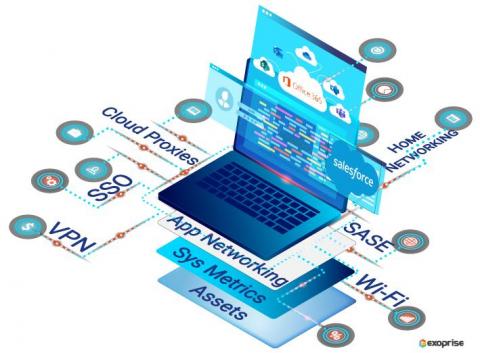
If you live and breathe in the technology industry, chances are you are hearing Digital Experience Monitoring a lot these days. So what is Digital Experience Monitoring (DEM), and why is IT obsessed with it? With a remote-first culture brewing in every company, IT needs to ensure that employees on their machines are productive and satisfied with the performance of typical enterprise applications such as Microsoft 365, Salesforce, Workday, etc. A DEM solution collects application and desktop user experience (UX) insights holistically, giving IT a broader context for troubleshooting performance issues. Let's discuss six use cases for DEM.

How Does a Digital Experience Score Optimize the Workplace

User experience is subjective. For example, asking tourists visiting New York City about their experiences gives different answers. Likewise, end-users who work remotely with different resources and disparate assets can have varied experiences with their business applications. How can IT teams gather this experience data and react faster to improve experience? The answer is Digital Experience Scores.

How to Monitor Microsoft Exchange Online and Outlook Performance

Exoprise Email Graph sensor tests and monitors Microsoft 365 Exchange Online using the new Graph API. As businesses continue to operate remotely, it is more important than ever to have a robust email communication infrastructure for collaboration. When email access is down or slow, it impacts end-user productivity, and businesses suffer. CloudReady Email Graph API sensor synthetically tests Microsoft Graph authentication, permission access, uptime, and mailbox availability no matter what location. Monitor Office 365 Mail queues, SPAM filters and troubleshoot slow email delivery for exchange online.
Sponsored Post

Why Exoprise Beats the Competition

Digital Experience Monitoring (DEM) solutions like those from Exoprise monitor SaaS and custom web applications behind the firewall or cloud to deliver optimal performance to end-users. In a survey done by Forrester, 51% of technology teams and individuals are now objectively managed on providing the right technology to improve and manage the end-user experience. While the onset of COVID may have led companies to restructure a year ago, the same companies are now presented with new challenges to support a hybrid workforce and retain the best employees.

Proactive VPN Monitoring for the Hybrid Workforce

A VPN, allows remote employees to create a secure traffic connection to the corporate network. These connections essentially tunnel from a computer or mobile device through a VPN server, often through the public Internet. VPN technology has been around since the mid-1990s, but its usage is now going mainstream due to Covid. As Covid accelerates, it means new monitoring challenges for IT amid a high VPN adoption.

How to Monitor Microsoft OneDrive for Business

Exoprise supports Microsoft 365 OneDrive monitoring similar to SharePoint with OAuth credentials as well as full experience monitoring via a headless browser. The sensor emulates a real user signing into OneDrive to collect end-to-end performance metrics such as health score, server latency, login times, etc. across the infrastructure and measure optimal availability.

How to Monitor Microsoft Azure Active Directory (Azure AD)

Monitor Microsoft 365 Azure Active Directory (AAD) with Exoprise CloudReady. AAD is an enterprise multi-tenant cloud directory and identity management service. In your business, employees who work from home remotely or the office rely on Azure AD to log in to multiple Office 365 services and access them through a single set of cloud credentials.

Monitor Microsoft 365 Client Apps in Real-Time

Microsoft 365 client applications such as Outlook, OneDrive, and Teams are standalone programs that perform the bulk of the resource and workload processing on a user’s computer. Data retrieval and verification for these applications happen on the client-side, and communication with the server is not continuous. Exoprise customers worldwide use the Office 365 client apps to manage their daily routine and work productively from home, HQ, or branch offices.

3 Incredibly Useful Metrics For Monitoring the Microsoft 365 Teams Desktop App

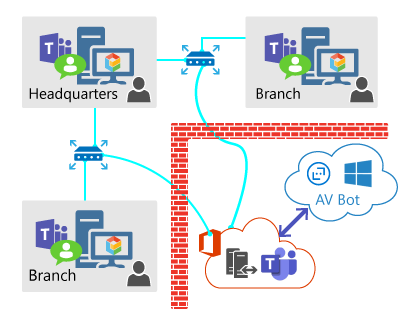
You use Microsoft Teams, correct? Microsoft 365 Teams Desktop app is a standalone program that performs the bulk of the resource and workload processing on a user’s computer. Data retrieval and verification for these applications happen on the client-side, and communication with the server are not continuous.

Sponsored Post

Real User Monitoring for Microsoft 365 and SaaS Performance Issues

Service Watch for Real User Monitoring (RUM) has come a long way. Our last product update announcement talked about new layouts for Service Watch Browser (SWB) and Service Watch Desktop (SWD). These new layouts and widgets provide IT with a holistic end-user experience score. If we try to use business-critical application services from home (or call it #WorkAnyWhere), the experience is often not the same as working from corporate headquarters. Service Watch closes this gap with its browser and desktop passive monitoring solution, enabling IT to collect 1000's of advanced metrics for accelerating troubleshooting.