Teams | Collaboration | Customer Service | Project Management

User Live Stream | Award winning Employee Monitoring Software | We360.ai

Get a live vision to your employees’ screen- Current application being used, total duration of usage, and active status, like a Live stream of a computer. It is a powerful monitoring feature that simplifies visualization to take real-time tracking to the next level.

Connecting Hubshare to M-Files Vault | The Smarter Way To Work

This video is part of a tutorial series on M-Files for Hubshare. To reap all the benefits of the M-Files for Hubshare integration, we must first connect your M-Files vaults to Hubshare. And that's precisely what you'll learn how to do in this video. MORE INFO: Hubshare offers a secure digital workplace portal that enhances user and client engagement through collaborative working, secure file sharing and project management. Together, with M-Files, external collaboration is more controlled and secure than ever before.

Project Schedule Management (How To Get Started)

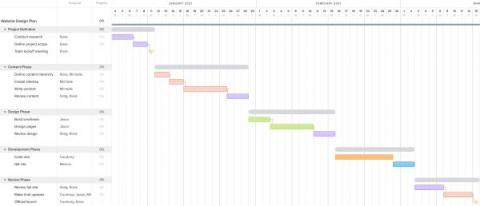
Project schedule management is essential to the successful completion of any project. By mapping out a clear schedule, you can hold team members accountable to deadlines for specific tasks and ensure projects are completed within agreed timeframes. You can use project schedule management software to outline key milestones and assign team members to complete certain tasks.

OneDesk - Archiving & Auto-Archiving Tickets (or Tasks)

Learn about archiving your tickets, tasks and projects in OneDesk OneDesk combines Help Desk & Project Management software into a single application. OneDesk also includes customer-facing applications: real-time chat, customizable webforms, and a customer portal. These integrated applications allow you to serve your customers while conveniently working on your projects in one platform.

OneDesk - Configuring Forms

Setup internal and external forms. OneDesk combines Help Desk & Project Management software into a single application. OneDesk also includes customer-facing applications: real-time chat, customizable webforms, and a customer portal. These integrated applications allow you to serve your customers while conveniently working on your projects in one platform.

How to Set Up a Job Board Website?

As it is common for the online community to use the internet to land in their next job, a whole new opportunity comes along. It is your perfect chance to develop and grow your business that connects the employers and the employees. How to Create an Online Job Board? This question strikes our minds, but we often fail to answer them correctly. This piece aims to make you understand the setup of the Job Board Website successfully.

How to Schedule a Teams Meeting in 2022 (Step-by-Step Guide)

Microsoft Teams (MS Teams) is a popular collaboration and video conferencing app designed for individuals, freelancers, small businesses as well as large corporations. You can use it to conduct virtual meetings instantly. All you need to do is click the ‘Meet Now’ button to get started. But what if you want to schedule your next business meeting to accommodate everyone’s schedule?