

Teams | Collaboration | Customer Service | Project Management

7 Best Project Management Software for Agencies That Track Budgets and Billing

What are the criteria for this guide? Client-based project management. Projects grouped by client, with tasks, assignees and deadlines. Tags or a text field for the client name don’t count. Native time tracking. Time logged against projects or tasks inside the tool. A separate tracker bolted on through an integration doesn’t count. Project budgets. A budget per project, in hours or money, tracked against logged time. A custom number field doesn’t count. Actively developed.
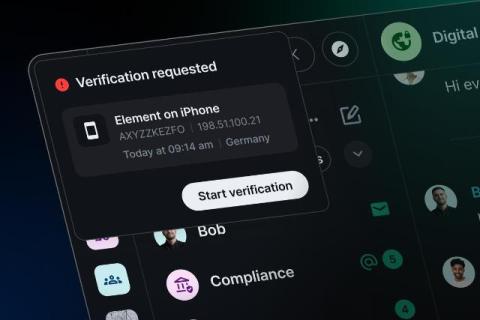

Element Web: Device verification becomes mandatory by default

Starting with Element Web / Desktop 1.12.33, verifying your device is mandatory by default. After signing in on a new browser or desktop session, you will be asked to verify it before you can start chatting. The step can no longer be skipped. Sessions that already exist and are unverified continue working as is for the time being.

Zulip's Google Summer of Code 2026

This summer, 11 contributors completed the Google Summer of Code(GSoC) program with the Zulip development community. This was the 11th consecutive year that Zulip participated in GSoC; over 140 contributors have now completed one of our formal internship programs, primarily through Google Summer of Code and Outreachy. Our welcoming community is fully committed to helping bring up the next generation of open-source contributors from a wide range of backgrounds.

Secure Document Sharing Platform: Features to Look For & Best Tools

Enterprises share confidential documents every day, from financial reports and legal contracts to government records, customer information, and internal strategy documents. These files frequently move between departments, external partners, contractors, and clients, often through several tools before the work is complete. A secure document sharing platform lets your team share these confidential files while maintaining security and compliance.

How to Turn Features On or Off in Flowace

Learn how to turn features on or off in Flowace with Feature Permissions: turn on what you need, turn off what you don't, and customize your workspace for all users. Open Admin Settings, then Default Settings, then Feature Permissions. Each feature has its own toggle, so you can set up your workspace in a few clicks. In this video: Chapters: Example setup used in this video: Features and values shown in this video are examples. Set them to suit your company policy.

How to Set Organization Default Settings in Flowace | Flowace

Learn how to set organization defaults in Flowace Default Settings, so every new member starts with the same time zone, timesheet rules, monitoring options and project settings. Set things up once in Admin Settings › Default Settings, then change individual users later under Permissions. In this video: Chapters: Example setup used in this video: Names, days, times and values shown in this video are examples. Set them to suit your company policy. Check your local rules on employee consent before turning on screenshots or activity monitoring.

Customise Your Dashboard in Flowace: Add or Remove Widgets

Learn how to add and remove widgets on your Flowace Dashboard, so it shows the views you want, using Manage Widgets. Open Manage Widgets, look through the Add a Widget panel, and add or remove a widget with one click. In this video: Chapters: Names, apps and values shown in this video are examples. Set them to suit your company policy. Need help? Write to [email protected].

AI Agents for Employee Service: 5 things to look for | Zendesk

About this video: What should you look for in AI agents for employee service? This video covers five criteria to evaluate: knowledge coverage, permissions and security, ability to take action, channels and integrations, and measurable outcomes and cost. Learn how AI agents differ from chatbots and portals, and how they can support employee requests across HR, IT, and onboarding—from answering benefits questions to submitting time-off requests and coordinating account setup. You’ll also see why human handoffs, clear permissions, and a focused first workflow matter when choosing an agent.