
|
By Druti Hiran
Workforce management software helps businesses plan employee schedules, track working hours, record attendance, manage time off, and review work-hour data in one place. It also turns this data into reports that help managers spot staff shortages, track attendance, control labor costs, and plan work more effectively. Some workforce management systems, especially those used in retail and contact centers, also forecast how many workers a business will need at different times.
|
By Druti Hiran
Idle time is a period when a monitored computer shows no keyboard or mouse activity for a set amount of time, even though the employee is still clocked in. It shows a lack of detected computer activity, but it does not by itself confirm that the employee stopped working. This article explains what is idle time, how idle time is detected, what can count as idle time, what a normal range may look like, and how to calculate your idle time percentage. TL;DR.
|
By Druti Hiran
Employee website monitoring software tracks the websites and URLs employees visit during work and organizes that activity into categories. Teams can use the data to understand browsing patterns and see how work time is being spent. This article focuses on three parts of website monitoring i.e. website and URL reporting, blocklists, and allowlists. It explains what each one does and where they differ. TL;DR.
|
By Druti Hiran
An employee productivity app tracks work time, app and website use, and idle time on work computers. Before choosing one, compare what employees can see, what managers can track, and which devices the app supports. This article compares what employees and managers can each see in Flowace, whether it runs on your team’s computers, and how to calculate what idle time is actually costing you. TL;DR.
|
By Druti Hiran
Screen monitoring privacy explains what employers can see, what data a monitoring tool collects, and when tracking happens. Most screen monitoring software can show app and website activity, active and idle time, and screenshots. This article explains what managers and employees can actually see with Flowace and how its privacy controls work. TL;DR.
|
By Druti Hiran
Best workforce management software helps businesses schedule shifts, track time and attendance, and understand how work hours are used. Some platforms also include HR and payroll, while others focus on scheduling, time tracking, activity monitoring, or workforce analytics. This article compares 8 platforms which are Flowace, UKG Ready, Paycor (a Paychex company), BambooHR, Deel HR, Connecteam, Hubstaff, and ActivTrak. Pricing was last checked on September 29, 2026. TL;DR.
|
By Druti Hiran
Best employee monitoring software in US helps employers track work time, app and website activity, attendance, and, in some tools, security activity. We compared 9 of the best options for US teams based on features, US pricing, deployment, G2 ratings, and state notice rules. Flowace, CurrentWare, ActivTrak, and Teramind lead the list, with each suited to different monitoring needs. The comparison table below gives you the key details at a glance. TL;DR.
|
By Druti Hiran
Idle time tracking software shows when a computer has little or no keyboard or mouse activity, helping teams understand how work time is being used. This article covers how to set it up, configure thresholds and exclusions, and read idle-time reports before choosing a tool. TL;DR.

|
By Druti Hiran
Overworked employees often shows clear signs before burnout happens. Missed deadlines, longer work hours, less communication, and lower productivity can show that the workload is too high. This article covers the key signs of employee overload, including what you can spot in one person and what you may notice across a team. Use the 60-second check below to see where your team stands. TL;DR.
|
By Druti Hiran
Back office BPO is the outsourcing of internal business tasks to a third-party service provider. These tasks support daily business operations but do not involve direct customer interaction. Common examples include data entry, payroll, accounting, claims processing, and document management. Businesses use back office BPO to reduce costs, improve efficiency, and free internal teams to focus on core work.
Learn how to turn on Ignore Idle in Flowace so time in calls, meetings and training is not marked as idle. Flowace marks time as idle when there is no keyboard or mouse activity for the time your admin sets. But sometimes you are still working, for example listening in a call or watching a training. Turn on Ignore Idle to keep tracking time even when you aren't moving your mouse or typing. In this video.
Learn how to set the idle time threshold in Flowace, the number of minutes without keyboard or mouse activity before time is marked idle. You can set a default for new users in Default Settings, and change the value for one employee in Permissions, Desktop App. Once the threshold is reached, the whole inactive period is marked idle. Shorter pauses stay active. In this video: Chapters: Example setup used in this video.

Learn how to set the idle time threshold in Flowace, the number of minutes without keyboard or mouse activity before time is marked idle. You can set a default for new users in Default Settings, and change the value for one employee in Permissions, Desktop App. Once the threshold is reached, the whole inactive period is marked idle. Shorter pauses stay active. In this video: Chapters: Example setup used in this video.
Learn how to create a Work Category in Flowace and use it to set Productivity Ratings for many apps and websites at once. A Work Category carries its own Productivity Rating, so it works as a template. Create a Communication category, mark it Productive, and any app or website you give that category follows the rating automatically. You can still edit a rating later. In this video: Chapters: Example setup used in this video.
Learn how to rate apps and websites as Productive, Unproductive or Neutral in Flowace, for your whole company, for a team, or for one person. The same app can be productive for one team and unproductive for another. Instagram may suit Marketing but not Development. Flowace lets you rate apps and websites for each scope, so each member gets the rating that fits their role. In this video: Chapters: Example setup used in this video.

Stop chaos at work. Start using workforce management software. Missed shifts. Double-booked meetings. "Wait, who's working today?" Spreadsheet nightmares. Sound familiar? Workplace chaos isn't just annoying—it's killing your productivity. But here's the thing: you don't have to live like this. Workforce management software turns the chaos into clarity. Automated scheduling. Real-time tracking. Instant visibility. Less stress, more results. The difference? Going from "Where is everyone?" to "We've got this" in one click.#WorkforceManagement Subscribe for more relatable work moments and productivity tips!

Stop Working Alone. Start Working with AI. We've all been there—drowning in tasks, working twice as hard, wondering why productivity feels like a constant uphill battle. But what if the secret wasn't working harder... it was working WITH someone (or something)? When humans team up with AI, magic happens. This is the workplace moment that changes everything: realising AI isn't your replacement, it's your ultimate work buddy. Human creativity + AI efficiency = results that'll make your boss do a double-take.
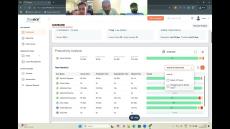
Explore Flowace in action with the Simvisr Team as we dive into how teams can achieve accurate time tracking and boost productivity. This live demo showcases how Flowace monitors websites and app usage, tracks active vs idle hours, detects suspicious user activities through screenshots and keystrokes, and helps you distinguish between productive and unproductive work time.

Why risk the traffic when you can trust the time tracker? In a world full of office commutes and endless honking, Flowace helps teams work smarter, not harder. With AI-powered time tracking, productivity insights, and transparent performance analytics, you can finally trust your remote workforce to deliver from anywhere. Productivity isn’t about dealing with a stressful commute to the office. It’s all about finding ways to be awesome while working from the comfort of home!
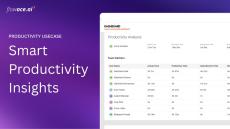
Are you struggling with team productivity, time leaks, or accountability? Meet Flowace – your intelligent productivity assistant that helps organizations boost efficiency through automated time tracking, employee insights, and activity analytics. In this short demo, we’ll walk you through how Flowace helps: Track work hours effortlessly Gain actionable productivity insights Improve time utilization across teams Enable silent tracking for transparency without micro-managing Integrate seamlessly with tools like Jira, Slack, HRMS, and more.
- October 2026 (10)
- September 2026 (2)
- August 2026 (1)
- July 2026 (7)
- June 2026 (6)
- May 2026 (1)
- April 2026 (12)
- March 2026 (5)
- February 2026 (4)
- January 2026 (5)
- December 2025 (5)
- November 2025 (5)
- October 2025 (3)
- September 2025 (4)
- August 2025 (8)
- July 2025 (9)
- June 2025 (10)
- May 2025 (2)
- April 2025 (8)
- March 2025 (4)
- December 2024 (17)
- November 2024 (3)
- September 2024 (1)
- August 2024 (2)
- July 2024 (10)
- June 2024 (1)
- April 2024 (8)
- March 2024 (7)
- February 2024 (14)
- January 2024 (8)
- December 2023 (4)
- November 2023 (1)
Flowace is an intuitive tool for simplified workforce productivity management.
Effortlessly monitor your employees activities like usage of apps and websites, meeting time, transit time, and more. With Flowace, you can easily keep track of time and ensure that employees are focused on their work, irrespective of their work location.
Workforce analytics for modern teams:
- Performance monitoring: Get real-time insights on remote employees’ activity. With Flowace's productivity monitoring feature, you can spot areas for improvement and streamline operations. Thus boosting employees’ performance by identifying bottlenecks and ensuring better resource utilisation.
- Hybrid employee monitoring: Manage your remote workforce irrespective of their location. The Hybrid employee monitoring tool leverages you to track their work patterns, ensuring better team management. With Flowace, you can effectively monitor productivity, ensure data security, and streamline communication, leading to enhanced productivity.
- Remote employee activity analysis: Get actionable insight into how your team works with Flowace’s intuitive dashboard and customized timesheets. Our automated data empowers efficient time management and enhances informed decision-making, helping your organization optimize performance and productivity.
- Budget allocation: Stay on top of every project’s financial health. Get a holistic project overview, track how much time employees are spending, understand the resource allocation and identify the associated costs. This enables better financial control and maximises ROI for every project.
The all-in-one time tracking software to boost productivity for modern teams by minimum 31%.