Teams | Collaboration | Customer Service | Project Management

AI Adoption in Professional Services: Lessons from the front lines

AI is taking root differently across every organisation — faster among younger generations in some places, driven top-down by leadership in others, and complicated everywhere by the question of how to balance development speed with cultural change. In this panel from Canvas 26 Tokyo, leaders from three professional services firms come together to share what AI adoption actually looks like when you're running large-scale projects: the hands-on realities, the Miro use cases, and what it takes to make the shift stick across an entire organisation.

What is an IT system audit and why it matters for security

Every organization now runs on a growing web of laptops, servers, cloud tools and remote endpoints. Each device carries its own operating system version, patch status, storage load and security configuration, and any one of these can quietly drift out of shape. An outdated OS, a missed security patch, a nearly full hard drive or an unmonitored network setting rarely looks urgent on its own.

Decide What to Build Faster with Miro Prototypes

Building is happening everywhere. But just because you can build it doesn't mean you should ship it. The teams pulling ahead have figured out how to move quickly from idea to validated direction — aligning before building, not after. In this product spotlight from Canvas 26 Tokyo, Mathias Davidsen (Solutions GM, Prototypes at Miro) shows how Miro Prototypes acts as the decision layer in your product development workflow.

Physical × Human × AI - The Future of Business Collaboration

AI is no longer confined to screens. It's becoming a partner in how we think, collaborate, and create. In this fireside conversation from Canvas 26 Tokyo, Hidetoshi Kikuchi (General Manager, BUSINESS INNOVATION LOUNGE TOKYO, Ricoh), Masumi Harazuka, and Kosaku Nakajima explore what it actually takes to build effective human-AI collaboration — in meeting environments, in product development, and in everyday decision-making.

Where does your SaaS Data Actually Live

Where your SaaS data actually lives refers to the physical and legal locations where your organization's cloud data is stored, processed, backed up, and shared across infrastructure and third-party services. Understanding these data locations is essential for maintaining regulatory compliance, strengthening security, supporting digital sovereignty initiatives, and deciding when cloud or on-premise deployments are the better choice for sensitive business information.

How to Automate Employee Onboarding : Step-by-Step Guide

Learning how to automate employee onboarding starts with connecting the entire employee journey. A hiring event—such as an accepted offer or a new employee record—can trigger coordinated workflows across HR, IT, identity management, payroll, compliance, and employee-support systems. BambooHR notes that onboarding should continue for at least three months. When such an extended process depends on spreadsheets, repeated data entry, emails, and manual handoffs, it becomes a serious cost burden.

Hybrid, Remote, or Field: Does Your Tracking Strategy Actually Fit?

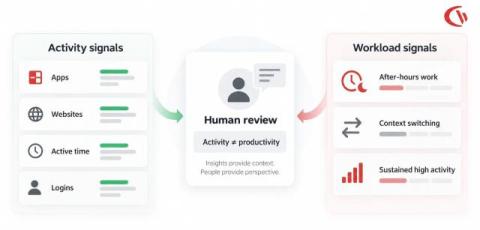
Managing today’s workforce isn’t just about tracking work; it’s about maintaining visibility across different ways of working. Some employees split time between home and the office, while others work fully remotely. Many others spend their day in the field. It means employees nowadays are working in different models. However, many organizations use the same tracking approach for all employees. That’s where problems begin.

Keeping Teams in the Flow of Work with Miro AI Workflows

Every organisation has AI. Almost none have AI that works across teams. The gap between individual productivity and organisation-wide impact is where most companies get stuck — and it's exactly what Miro built AI Workflows to close. In this product spotlight from Canvas 26 Tokyo, Product Management Director Joe McLean shows how teams are moving from isolated AI experiments to connected, automated systems that everyone can see, run, and build on together.

AI agent customer journey report: Visualize conversational paths, optimize performance | What's New

The AI agent customer journey report helps teams visualize how customers move through AI-powered support experiences from start to resolution. Using an interactive conversation journey map, teams can identify successful automation paths, uncover where escalations happen, and spot opportunities to improve AI workflows. Filter by AI agent, channel, or use case to better understand how automated experiences perform across customer journeys.