Teams | Collaboration | Customer Service | Project Management

See What Miro AI Can Do in Seconds!

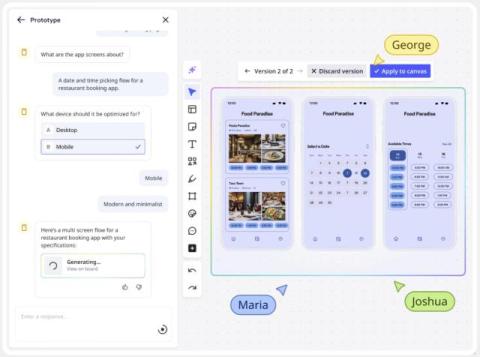
Learn how to supercharge your workflow with Miro AI in this comprehensive tutorial! Discover how to generate documents, images, sticky notes, tables, diagrams, and prototypes using AI prompts. We'll show you advanced techniques like incorporating board content as context, refining outputs, and using selected objects to trigger smart suggestions. Perfect for teams, designers, and anyone looking to boost productivity with AI-powered collaboration tools. Master Miro's newest AI features and transform how you brainstorm, plan, and create visual content.

From Research Chaos to Prioritized Backlog with Miro AI

Tired of spending hours turning scattered user research into prioritized product backlogs? Watch how Miro AI instantly transforms user personas, journey maps, bug reports, and feature requests into a structured, execution-ready backlog with priorities, estimates, dependencies, and OKR alignment. Perfect for product managers, product owners, and agile teams looking to streamline their backlog refinement process.

What's New: What we launched in August 2025

Great work doesn’t come out of nowhere — it builds on what came before. Your team’s research insights, brainstorm notes, and workshop outcomes all bring value to the table. That shouldn’t vanish every time you switch tools or start working on something new. This month’s Miro updates carry your thinking forward.

How to Record, Transcribe & Share Video Calls in Miro

In this demo, Josh (Product Manager at Miro) walks you through the complete process of starting, recording, transcribing, and sharing video calls in Miro. You'll discover how to launch a video call directly from your Miro board, capture the discussion with built-in recording, and automatically generate transcripts that you can edit and organize right on the board. Whether you’re running team standups, workshops, or stakeholder check-ins, you’ll learn best practices for keeping everyone aligned without adding more meetings to their calendar.

Turn Customer Journey Maps Into Action Plans with Miro AI

Learn how to transform your customer journey maps into actionable opportunity backlogs using Miro AI. Watch as we turn customer research and pain points into prioritized action items with impact estimates, timelines, and success metrics. Perfect for product managers, UX designers, and customer experience teams looking to bridge the gap between insights and implementation.

Turn Your Team Retrospectives Into Gold with Miro AI Analysis

Discover how Miro AI revolutionizes retrospective analysis by reading months of team data and identifying patterns you'd never find manually. Watch as we transform 6 months of retro boards into a comprehensive analysis document with key insights, persistent challenges, and actionable recommendations. Perfect for agile coaches, scrum masters, and team leads looking to maximize their retrospective value.

Design meets collaboration: Adobe Express now in Miro

We’ve teamed up with Adobe to bring powerful visual editing into the heart of your collaborative workflows. With Adobe Express now integrated in Miro, you can plan, brainstorm, and design—all in one place. This partnership gives teams the creative tools they need, right where collaboration happens. No more bouncing between apps, waiting on file transfers, or losing momentum. This launch marks the beginning of a shared vision between Miro and Adobe to redefine how teams create together.

Transform your collaboration and context into the prompt with Create with AI

Create with AI understands your teamwork on the canvas. So instead of switching between tools and copying over critical context to create great prompts, you get ahead in one place with a smart collaborator that’s already thinking what you’re thinking.

See What Miro AI Can Do in Seconds!

Learn how to supercharge your workflow with Miro AI in this comprehensive tutorial! Discover how to generate documents, images, sticky notes, tables, diagrams, and prototypes using AI prompts. We'll show you advanced techniques like incorporating board content as context, refining outputs, and using selected objects to trigger smart suggestions. Perfect for teams, designers, and anyone looking to boost productivity with AI-powered collaboration tools. Master Miro's newest AI features and transform how you brainstorm, plan, and create visual content.