Teams | Collaboration | Customer Service | Project Management

Project planning steps every team can follow

If I’ve learned one thing in my years of juggling projects, it’s that one without a clear plan will always find a way to go off course. Sometimes the cracks show up subtly via the odd missed deadline or overlooked detail. Other times, the chaos is far more obvious, with Slack pings flying in every direction, and weekend work no one signed up for. These issues rarely come down to the team. More often, they come down to how the project was planned (or how it wasn’t).

4 free task tracker templates to get you organized

If I’m searching for “task tracker Excel,” it’s usually because I don’t want anything complicated. I just want a simple way to stay on top of my tasks without adding more stress to my day. And honestly, that makes complete sense. Excel was my go-to for task tracking for years and for good reason. It’s familiar, flexible, and easy to shape around the way I already work.

The best campaign management software for 2026

•A project timeline is a visual roadmap that orders deliverables, tasks, dependencies, and milestones by date, so teams can see what happens next and when it is due. •Timelines clarify priorities, keep the big picture visible, and align stakeholders around shared goals. They also improve communication, unify distributed teams, and surface bottlenecks before they delay delivery.

Project implementation plan: What to include and 5 essential steps

•A project implementation plan explains how a project will be carried out, defining goals, scope, responsibilities, resources, and timelines so everyone is aligned from the outset. •Starting with an implementation plan improves project outcomes by creating a clear roadmap, aligning stakeholders around shared goals, and reducing miscommunication. •Clear ownership within an implementation plan strengthens accountability, making it easier to track progress and address issues early.

Unlock true team availability with Google and Outlook Calendar events in Planning views

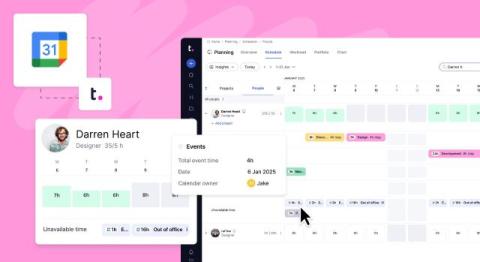
When scheduling resources, the difference between perceived availability and actual availability can make or break your project timelines. You might think a team member is free and begin assigning work, only to find out they’re booked solid in meetings all afternoon. How do you mitigate this? Well, Teamwork.com’s Planning views are getting a whole lot smarter—Google Calendar and Outlook Calendar have moved in!

Marketing resource management: What it is, benefits & the best marketing resource management software

From my experience as a Content Marketing Manager at Teamwork.com, I’ve seen how marketing resource management is changing the way teams and agencies organize their work, manage assets, and use capacity more efficiently - reducing last-minute fire drills, preventing bottlenecks, and improving campaign delivery.

The best project scheduling tools for 2026

Managing multiple projects without a project scheduling tool? Chaos. Think color-coded spreadsheets (version chaos, manual updates, broken formulas), rogue sticky notes (falls off wall, no digital record, gets lost), and an inbox saga worthy of its own Netflix series (200+ unread emails, buried updates, "where's that approval?" confusion).